
Payment Portal Terms & Conditions
These terms govern the use of Elev8's online payment portal and apply to all payment transactions processed through elev8group.io and any Elev8-operated payment pages. Please read them carefully before submitting a payment. By completing a payment through this portal, you agree to be bound by these terms in full.
Payment Authorisation
By submitting payment, you confirm that
You authorise Elev8 to charge the credit or debit card provided for the Invoice Number entered in the Payment Information section. You certify that you are the authorised user of the card being charged and that payment relates to a valid invoice issued by Elev8. You have read and agree to these Payment Portal Terms & Conditions and to Elev8's Terms of Use.
Currency & Exchange Rate
Elev8 invoices clients in GBP (£), AUD ($), or USD ($) depending on the territory and engagement terms. If you are paying with an international Visa, Mastercard, or American Express card, please note the following:
- 1 The purchase price may fluctuate based on the exchange rate applied by your card issuer at the time of the transaction.
- 2 Your bank or card issuer may apply foreign currency conversion fees, which can increase the total cost of your payment. Please contact your card issuer to confirm any such fees before submitting payment.
- 3 By completing payment, you confirm acknowledgement and acceptance of any gain or loss resulting from exchange rate adjustments applied by your bank or card issuer. Elev8 will not be liable for any such loss, nor will it pursue the cardholder for any amount where an exchange rate adjustment is made in the cardholder's favour.
Disputes
In the event that a payment cannot be resolved directly with Elev8 and you dispute a charge with your card issuer, your electronic payment confirmation and invoice record may be used as evidence that the charge is valid. If you have any concerns about a payment processed through this portal, please contact Elev8 directly before initiating a chargeback dispute.
Troubleshooting Payment Errors
If you experience an error when submitting payment, work through the following steps before contacting Elev8:
- 1 If your card is new or recently reissued, ensure it has been activated with your card issuer before attempting payment.
- 2 Enter the card number without dashes, spaces, or special characters.
- 3 Ensure the billing address entered matches the address registered with your card issuer. If you have recently moved, confirm your current billing address with your bank before retrying.
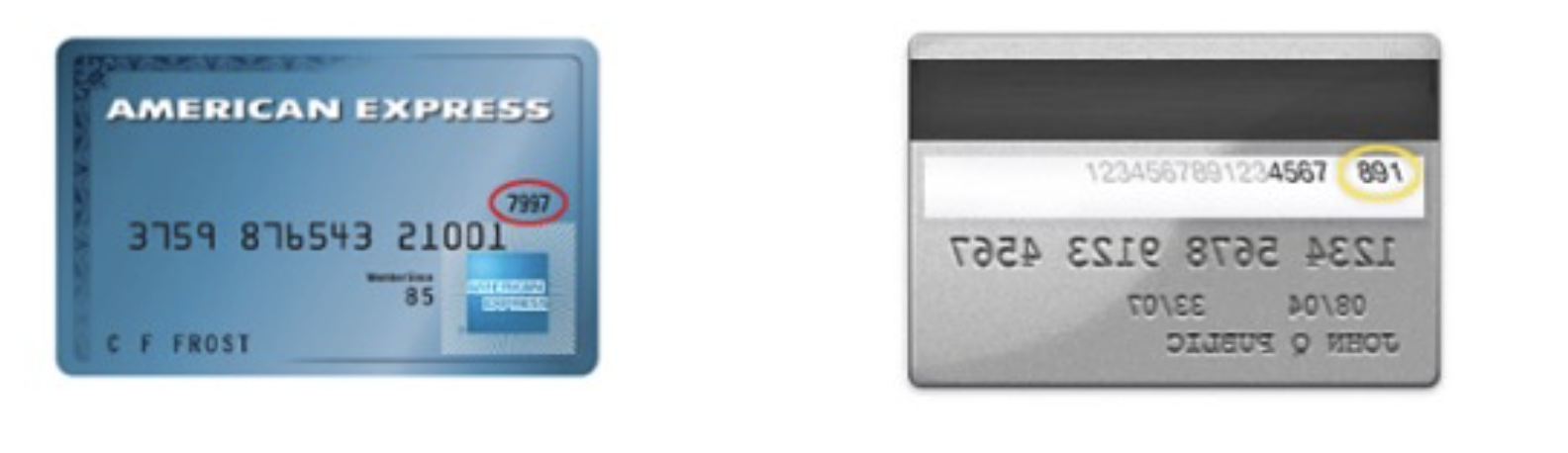
- 4 Enter your card's security code (CVV) correctly — see the guide below for where to find it on your card.
- 5 If the error persists, contact your card issuer's customer service team using the number on the back of your card. Your card issuer may need to speak with you before authorising an international or high-value transaction.
To avoid delays in processing your payment, ensure that the billing address entered matches the address held by your card-issuing bank. If you are unsure whether your card statement goes to your work or home address, contact your card issuer to confirm before submitting payment.
Security Code (CVV) Guide
The card security code (also known as CVV, CVC, or CID) is a unique security number printed on your card in addition to the card number. It is required to complete payment. Locate it as follows:
American Express Example:
Mastercard / Visa Example: